Prepare an e-Transport declaration and follow the UIT
Record the goods and transport details, validate the declaration and check ANAF's confirmation.
Before you begin
- Confirmed applicability and verified transport information for your company.
- A connected SPV account with e-Transport access for the selected CUI and environment.
- Who it is for
- Authorized Romanian company user with e-Transport permission
- Where to find it
- Dashboard
Step by step
Choose the operation
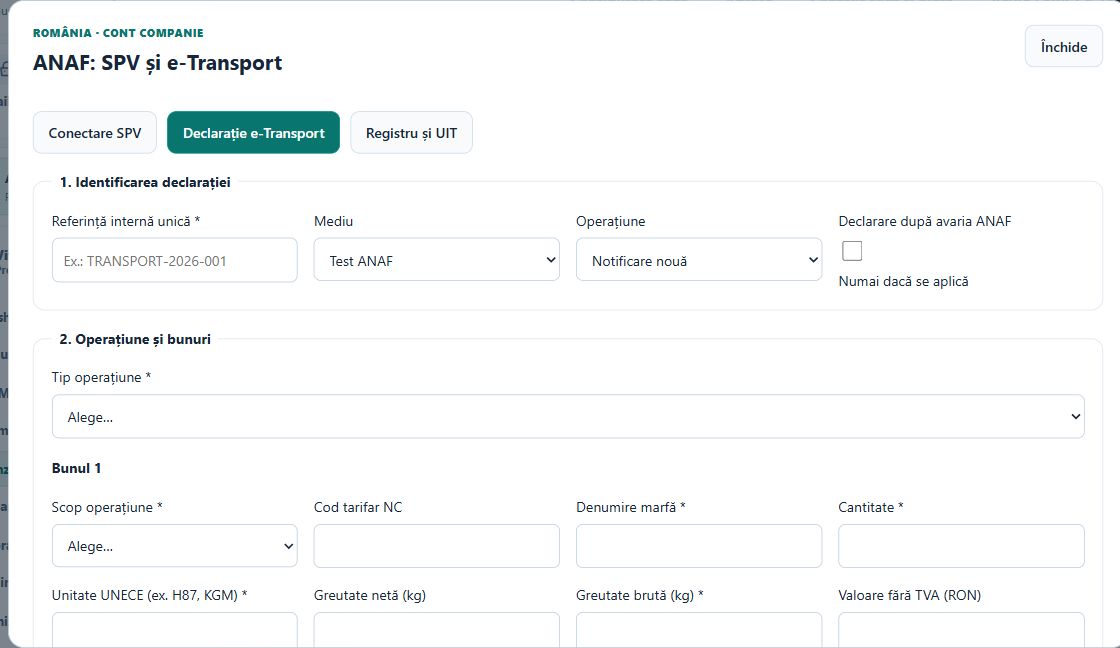
Open «ANAF · SPV / e-Transport» → «Declarație e-Transport». Enter a unique internal reference, select the environment and choose «Notificare nouă» or the appropriate follow-up operation.
Complete goods and transport
Enter the operation, goods, quantities, units, weights and values requested by the form. Use «Adaugă bun» for additional lines. Complete the commercial partner, organizer, vehicle and transport date.
Complete the route and documents
For departure and arrival, select the correct location type: Romanian address, border point or customs office. Complete the supporting document fields and review all required values.
Review before transmission
Prepare the declaration using the form action, then inspect its record and downloaded XML in «Registru și UIT». Check the environment and content before the explicit transmission confirmation.
Confirm and inspect ANAF's state
Confirm transmission only when intended. Use «Verifică starea ANAF» on the resulting record. A returned UIT is not usable until ANAF confirmation; inspect the validity period and reported status.
Manage subsequent changes
For correction, confirmation, vehicle change or cancellation, select the relevant operation and the accepted original declaration. Use the register reconciliation actions to follow the history. GPS monitoring is handled through the carrier's dedicated ANAF service or application, not this declaration module.
Check the result
The declaration, XML, submission status, confirmed UIT where issued, and subsequent operations remain traceable in the register.
If something is missing
If a follow-up operation has no selectable original, check that the original UIT is confirmed and belongs to the same environment. Resolve missing fields before preparing a new payload; do not assume a pending UIT is confirmed.
Availability depends on your role, enabled modules, country and company configuration.
Open in FreeBill Conect