Connect your company's ANAF SPV account
Authorize FreeBill for the selected Romanian company and verify access to e-Factura and e-Transport separately.
Before you begin
- A Romanian company context with the correct CUI.
- A certificate and ANAF authorization covering that company; the operator's application registration must be configured.
- Who it is for
- Authorized company user with fiscal configuration permission
- Where to find it
- Dashboard
Step by step
Check the company context
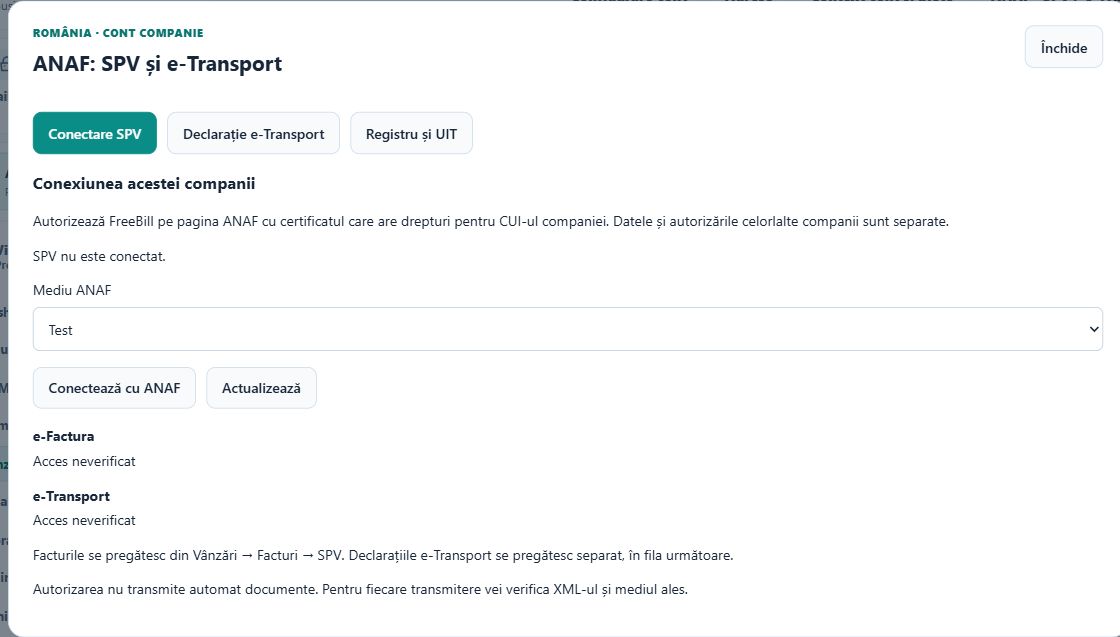
Select the company you intend to authorize. Open «ANAF · SPV / e-Transport» and select «Conectare SPV». Check the company name before continuing.
Choose the ANAF environment
Select «Test» or «Producție» according to the intended use. A test authorization or document must not be treated as a production operation.
Authorize on ANAF
Select «Conectează cu ANAF». Complete the ANAF certificate and authorization steps in the opened window. Do not send your certificate password through chat or support.
Verify each service
After returning, use «Verifică e-Factura pentru CUI» and, if needed, «Verifică e-Transport pentru CUI». Inspect the service-specific result and verification date.
Maintain the connection
Use «Actualizează» to refresh the displayed state. Where available, «Reînnoiește autorizarea» renews authorization; «Deconectează SPV» removes this company's connection. Connecting alone sends no fiscal document.
Check the result
The selected company's connection and separate service verification results are visible. Authorization for another company is not inherited.
If something is missing
If the connect button is disabled, review the company role and the operator-configuration message. A connected account without verified access for this CUI is not ready to submit that company's documents.
Availability depends on your role, enabled modules, country and company configuration.
Open in FreeBill Conect